Case Study
How merchants use Fullie to auto-fulfill orders and deliver digital files and license keys
Partially Fulfill Your Order
Have you ever found yourself needing to partially fulfill a Shopify order, rather than fulfilling the entire order? Or maybe you have a digital product that customers can add to their order along with other physical products?
Manually updating your orders one by one to mark the desired product as fulfilled can be time-consuming. This process needs to be fully automated.
Luckily, with Fullie, you can automatically fulfill the desired product. The automation runs in bulk on an hourly basis, so if you receive 100 orders every hour, Fullie will mark the desired product as fulfilled in all 100 orders at once.
Step-by-Step Guide
1. Create an Order
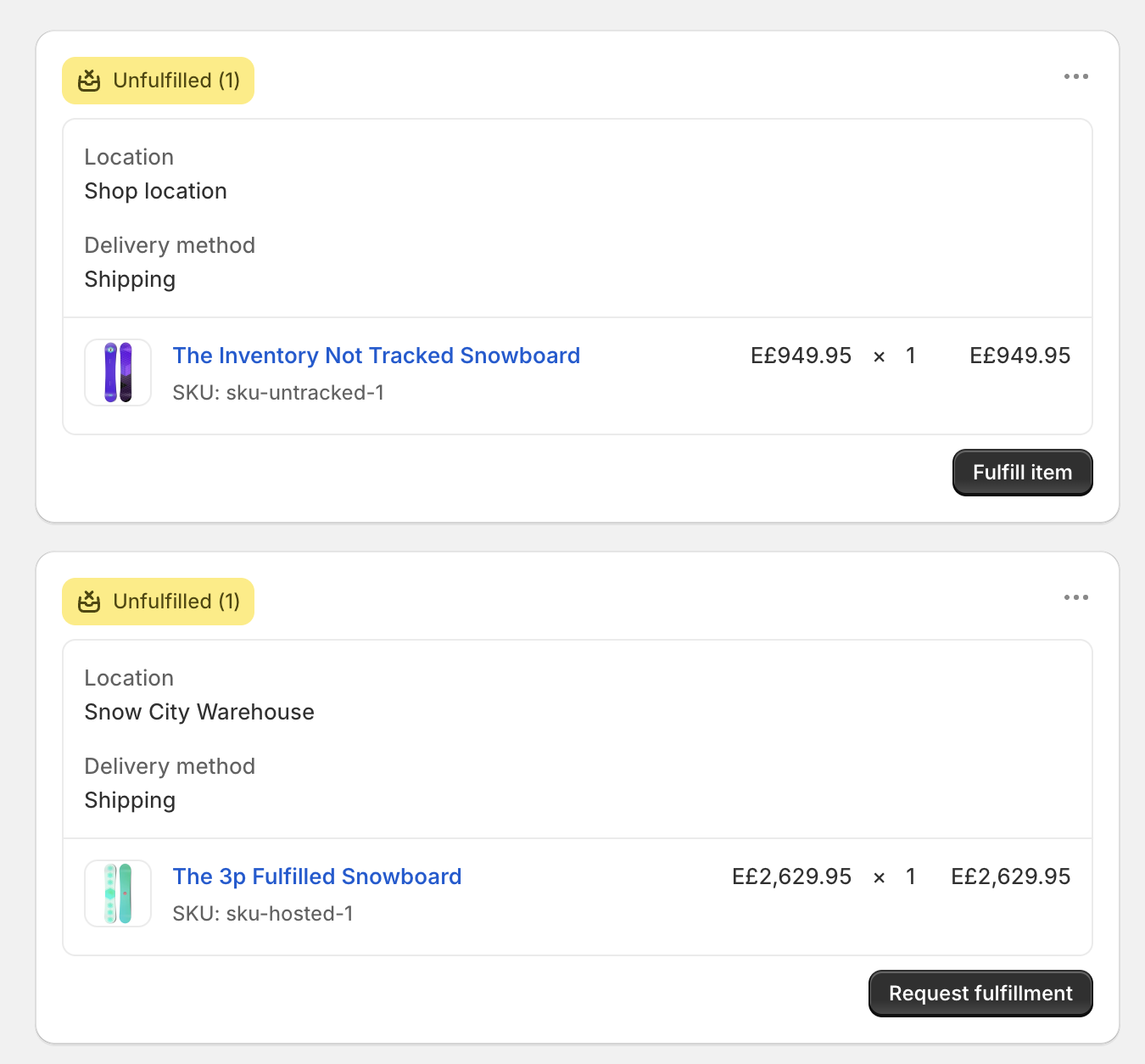
Let's imagine that a customer has placed the order below and you want the product The Inventory Not Tracked Snowboard to be automatically fulfilled.
2. Choose a Product
Navigate to the Fullie app within your Shopify dashboard, turn on the auto-fulfillment switch for The Inventory Not Tracked Snowboard, and click 'Save'.
3. Wait Until the Next Hour
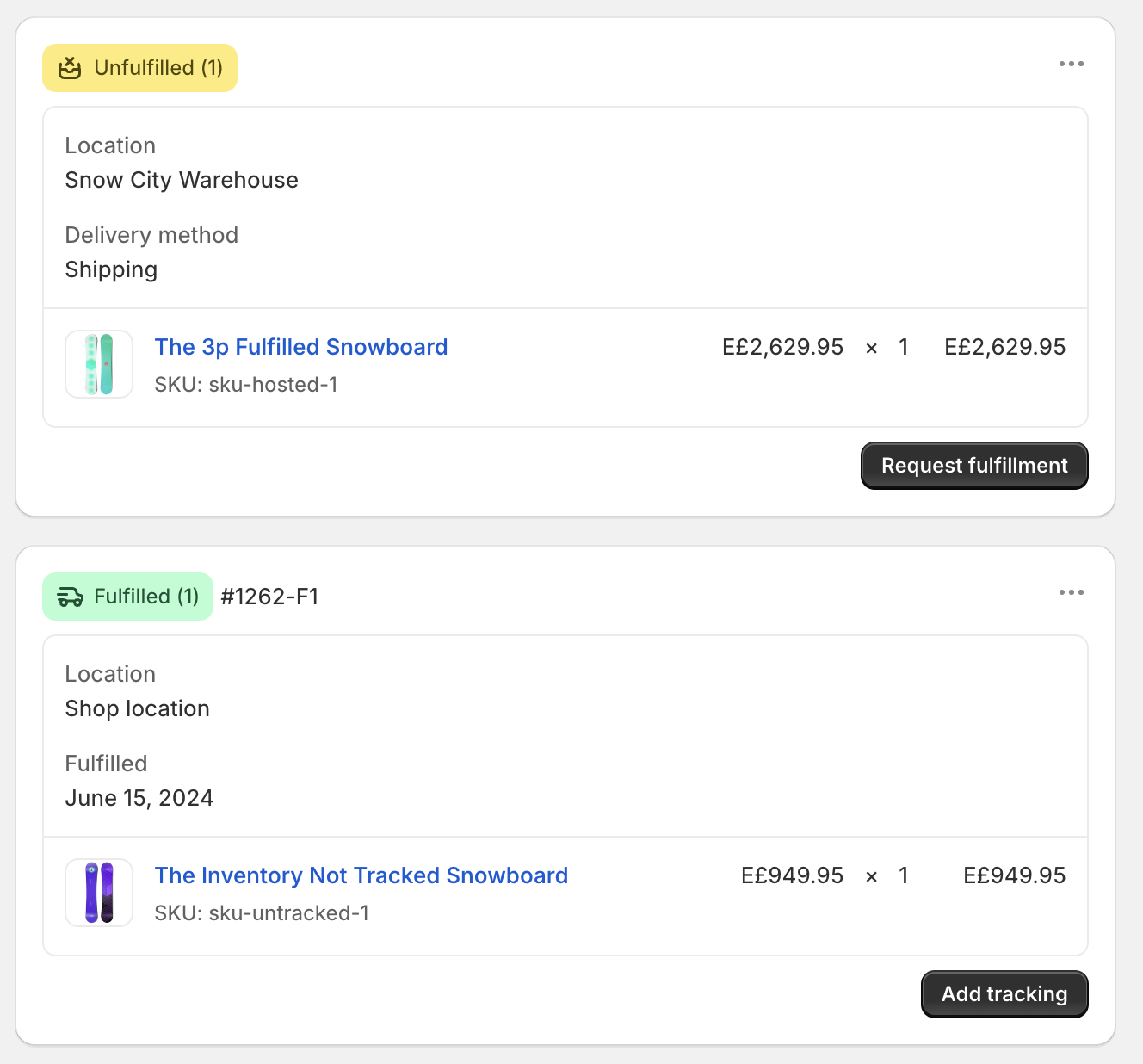
Within the next hour, you'll see that The Inventory Not Tracked Snowboard has been automatically fulfilled.
Wait for the Rest of the Order to Ship
Selling a digital extra alongside physical products, like a warranty, a setup guide, or a bonus download bundled with a snowboard? You usually don't want that digital line item to fulfill on its own the moment the order comes in, because it splits the order into two shipments and triggers a "partially fulfilled" notification before the physical goods have even left the warehouse.
Fullie's "wait for other items" rule solves this. Turn it on for a product and Fullie will hold off on auto-fulfilling it until every other item in the order has been fulfilled. The bundle then goes out complete, in a single clean fulfillment, with no premature notifications to the customer.
Deliver Digital Files Instantly
Selling ebooks, design assets, audio, or any downloadable product? Emailing files by hand after every order does not scale, and generic download links are easy to share around. Fullie attaches your files directly to a product and delivers them the moment the order is placed.
1. Upload and attach your files
Open the product in the Fullie app and upload one or more files. Your uploads count against your plan's storage allowance, not your product limit, so you can attach files to any product.
2. Customers download right away
After checkout, the download links appear directly on the thank-you page and the order status page, so customers get their files without waiting for an email.
3. Stay in control
Set a link expiry and a maximum number of downloads per order. If an order is flagged as fraud-risk, refunded, or returned, Fullie automatically holds access so your files aren't handed out on orders that fall through.
Hand Out License Keys From a Pool
Selling software licenses, game codes, event tickets, or gift-card style credentials? Each customer needs a unique code, and running out mid-sale means unhappy buyers. Fullie manages a pool of keys per product and assigns a unique one to each order automatically.
1. Load your keys
Import a batch of keys in bulk, or add them one at a time. Each key is used once and never handed to two customers.
2. Automatic assignment on checkout
When an order comes in, Fullie pulls the next available key from the pool and shows it to the customer on the thank-you and order status pages, with the same fraud-risk and returned-order holds as file delivery.
3. Never run dry
Fullie alerts you before a pool runs out, so you have time to top it up before it affects a sale.
A note on your plan's product limit
Each plan includes a product limit. It applies separately to auto-fulfillment and to license keys, and the two are counted on their own: choosing a product to auto-fulfill does not reduce how many products can deliver license keys, and the reverse is also true. Digital file delivery is not affected by this limit at all. You can attach files to any product, and your uploads are governed by your plan's storage allowance rather than the product count.